
0

Password Configuration for MORX CR-03, CR-06, CR-15 & CR-20 RFID Readers
Protect your RFID reader settings and enhance system security by configuring an access password through the MORX Reader Configuration Software. This feature helps prevent unauthorized changes to reader parameters and ensures secure operation in industrial and access control environments
Configuration Overview
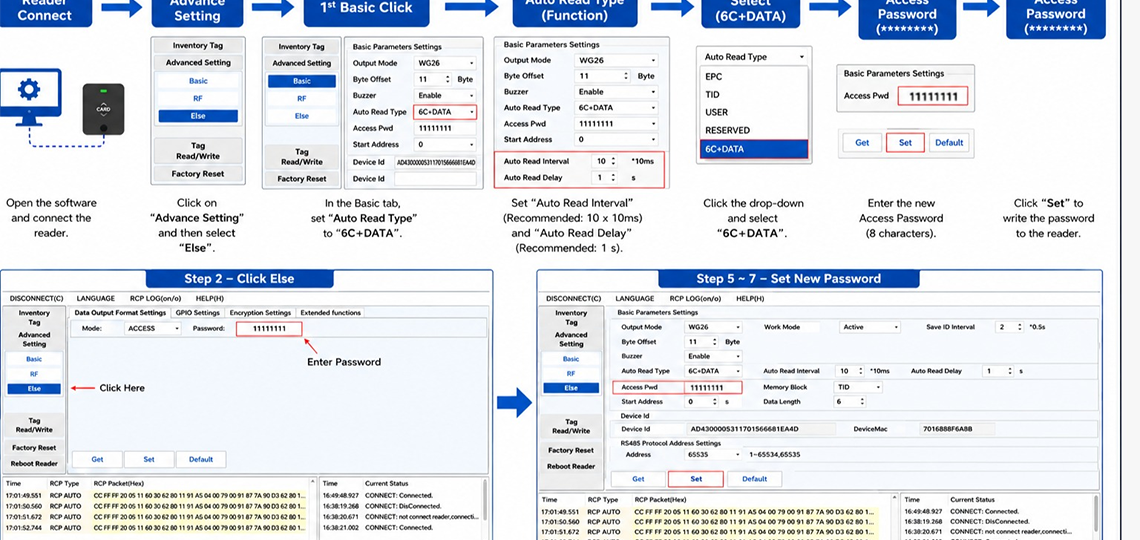
The password setup process is completed through the Advanced Settings → Else menu and requires only a few simple steps:
Step 1 – Connect the Reader
- Launch the reader configuration software.
- Connect your CR-Series RFID reader to the computer.
- Verify that the connection status shows Connected.
Step 2 – Open Advanced Settings
- Select Advanced Setting from the main menu.
- Click on the Else tab to access security-related settings.
Step 3 – Configure Auto Read Type
- Navigate to the Basic tab.
- Set Auto Read Type to 6C+DATA.
- Configure the recommended Auto Read Interval and Delay values.
Step 4 – Select 6C+DATA Mode
- From the drop-down list, choose 6C+DATA.
- This mode enables password configuration and secure data output.
Step 5 – Enter New Password
- In the Access Password field, enter the desired password.
- Password length must be 8 characters.
Step 6 – Save Configuration
- Click Set to write the new password to the reader.
- Wait for the confirmation message.
Step 7 – Verify Settings
- Confirm that the new password is stored successfully.
- Power cycle the reader if required.
Key Features
✔ Enhanced reader security
✔ Prevents unauthorized configuration changes
✔ Simple password management process
✔ Quick setup through MORX software
✔ Compatible with CR-03, CR-06, CR-15, and CR-20 models
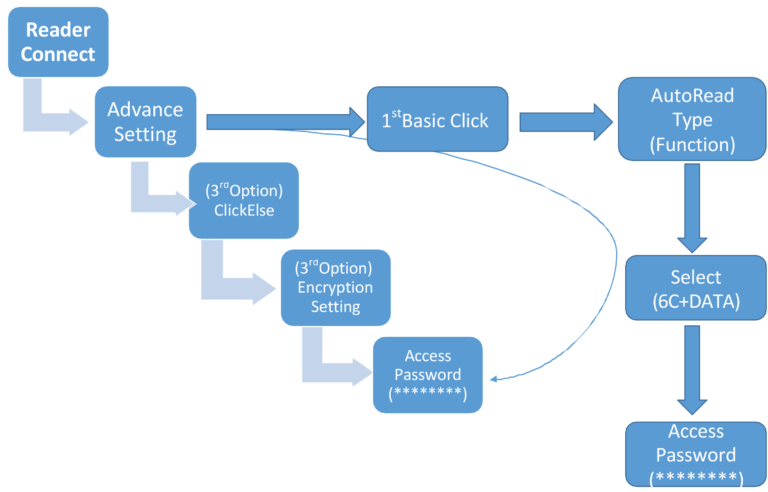
CR-06,CR-15,CR-20passwordSettinginSoftware
CategoryResources